
Internet
Airtel Launched New Three All-in-One Xstream Fiber Plans Starting at Rs 699


For its users, Airtel has introduced three new all-in-one plans. Three monthly subscriptions are available: Rs 699, Rs 1099, and Rs 1599, with speeds of 40Mbps, 200Mbps, and 300Mbps, respectively. These, according to the company, are designed to meet the changing entertainment needs of today’s connected households.
SonyLiv, Lionsgate, Hoichoi, ManoramaMax, Shemaroo, Ultra, HungamaPlay, EPICon, DivoTV, Klikk, Nammaflix, Dollywood, and Shorts TV are all available on Airtel Xstream Premium. All of the subscriptions include access to 14 premium OTT services. The Rs 699 plan includes a subscription to Disney+ Hotstar, the Rs 1099 plan includes Amazon Prime Video, and the Rs 1599 plan includes Netflix.
Following are the details for Airtel’s Xstream Fiber new all-in-one plans:
- With unlimited data, you have access to 17 premium OTTs. There are 350+ TV channels spanning the best of linear TV, including Netflix, Amazon Prime, Disney+ Hotstar, and Airtel Xstream Premium ((SonyLiv, Lionsgate, Hoichoi, and 11 more OTTs)).
- With the Airtel 4K Xstream TV Box*, you can watch both OTT and conventional TV shows with a single device and remote.
- The first month of leasing is free, and there are no installation fees.

There is a monthly FUP on broadband usage of 3333GB or 3.33TB. To kindly share, the company also offers a free first month of renting and no installation fees.
Also read – Airtel Black has introduced two new plans that include Xstream Fiber, DTH, and OTT subscriptions
Airtel has announced new Rs 399 and Rs 839 plans that include a complimentary Disney+ Hotstar subscription. The Rs 399 package from Airtel includes 2.5GB of data per day, 100 SMS per day, and unlimited local and STD voice calls. In addition, consumers will receive a three-month Disney+ Hotstar Mobile subscription. This Airtel plan has a 28-day validity period.
The Airtel Rs 839 plan comes with an 84-day validity period. This plan, like the Airtel Rs 399 plan, includes a three-month Disney+ Hotstar Mobile membership. The package includes 2GB of Internet each day, unlimited phone calls, and 100 text messages per day.
For More Such Updates Follow Us On – Telegram, Twitter, Google News, WhatsApp and Facebook



Google Bard has recently received a significant update, introducing various new features to enhance user experience. However, it’s essential to be cautious with your chat history, as Google saves your conversations to improve the Bard service. To ensure the privacy of your personal chats, it’s recommended to delete your Google Bard chat history and disable Bard activity permanently. This guide will help you through the process step by step.
Section 1: Deleting Google Bard Chats
- Open Bard: Launch the Bard application or visit the Bard website.
- Access Chat History: Locate the menu icon in the top-left corner of the interface and click on it. This action will reveal a sidebar containing your Google Bard chats.
- Select Chat to Delete: Hover your mouse over the chat you wish to remove and click on the three-dot menu icon that appears.
- Choose “Delete”: From the options presented, select “Delete.”
- Confirm Deletion: A dialog box will appear on the screen. Click on the “Confirm” button to delete the selected Google Bard chat.
Section 2: Disabling Google Bard Activity
- Launch Bard Activity: Open the Bard application or visit the Bard website.
- Access Activity Settings: Locate the “Activity” button situated in the top-right corner of the interface and click on it.
- Navigate to Bard Activity: Within the menu that appears, select the “Bard activity” option.
- Turn off Bard Activity: Find the toggle switch labeled “Bard activity” and switch it off. By doing so, you prevent Google from collecting data such as your IP address, location, prompts, and responses during your use of Bard.
- Delete Existing Bard Activity: To remove all your existing Bard activity, click on the “Delete” button.
- Select All Bard Activity: In the new window, choose the “Always” option to select all your Bard activity saved until now.
- Confirm Deletion: Click on the “Delete” button to remove all your Bard activities from Google’s servers.
- Set Auto-Deletion Time: Scroll down to the “Auto-delete” section and click on it.
- Choose Time Period: Adjust the time period to a minimum of “3 months” using the provided options.
- Proceed: Click on “Next” to confirm your selection. This action ensures that all Bard activities older than three months will be deleted automatically.
- Confirm Auto-Deletion: Finally, click on “Confirm” to initiate the process. Your older Bard activities, including chats and related data, will be permanently removed from Google’s servers.
By following the step-by-step instructions outlined in this tutorial, you can effectively delete your Google Bard chat history and disable Bard activity to safeguard your privacy. Regularly managing your chat history and activity settings will help ensure the confidentiality of your conversations.
For More Such Updates Follow Us On – Telegram, Twitter, Google News, WhatsApp and Facebook
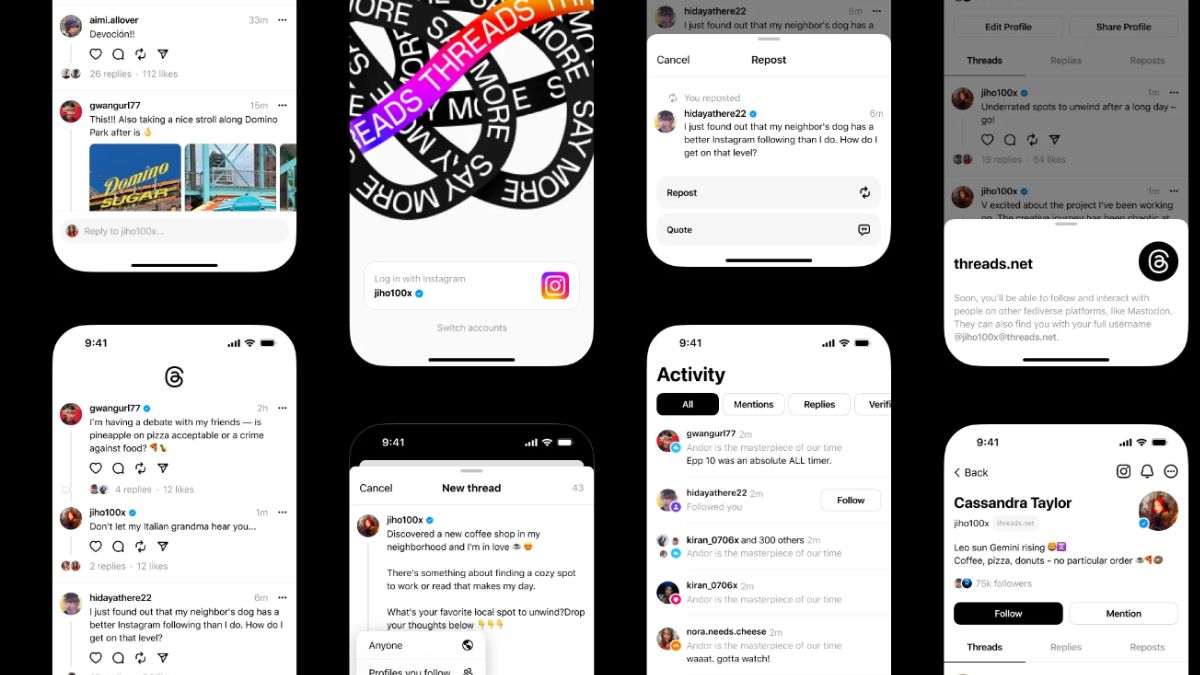
With the constant evolution of social media platforms, the arrival of a new competitor often catches attention and piques curiosity. However, with Meta’s backing, Threads is positioning itself as a promising text-first social media platform, aiming to provide a positive space for public conversations. With Twitter’s recent challenges under Elon Musk’s ownership, Threads aims to capitalize on the demand for a new and refreshing social media experience.
Distinct from its predecessors like Mastodon and BlueSky, Threads leverages the support of Meta, led by the influential Mark Zuckerberg. With an emphasis on seamless integration, Threads allows users to access the platform through their existing Instagram accounts. This convenient onboarding process grants access to the 2.35+ billion Instagram user base, enabling them to effortlessly transition and repopulate their new Threads feed with the individuals they follow on Instagram.
Threads has demonstrated tremendous potential, amassing over 90 million users at the time of this writing. This remarkable growth trajectory positions Threads as a strong contender to potentially claim the title of the fastest-growing app in history.
The core features of Threads are explained below, along with some tips for users:
Feed:
- The feed utilizes an algorithmic approach, combining content from followed accounts with suggested profiles.
- Users have control over who can reply to their threads by choosing the desired audience during thread creation.
- The ability to mute undesirable accounts is accessible by tapping the ••• icon next to the post.
Posts:
- There is a character limit of 501 for individual posts.
- Posts can be easily shared to Instagram Stories, with the added option to enhance the story using Instagram Stories filters.
- Post sharing may experience slight delays due to the platform’s high traffic.
Photos:
- Users can share multiple photos in a carousel format. Unlike Instagram, Threads’ carousels display pictures with varying sizes and ratios in an aesthetically pleasing manner.
- No noticeable limitations have been observed regarding file size, resolution, or image quality.
Videos:
- Videos are visually appealing but muted by default.
- The platform imposes a five-minute time limit for videos, although resolution restrictions are yet to be identified.
Links:
- Most links shared on Threads are accompanied by properly embedded images.
- Users can include a link in their bio by editing their profile, akin to the functionality on Instagram.
Account/Privacy:
- Threads offers the option to switch to a private profile independent of Instagram.
- Users can change their Threads profile picture, which remains separate from their Instagram account.
- The platform allows muting specific words, providing users with greater control over their experience.
- Notification settings offer granularity, allowing customization according to individual preferences.
- Account deletion is currently linked to the deletion of the associated Instagram account, although the Threads team is exploring possibilities for independent account deletion.
- Threads, like other Meta apps, requires access to various data on the user’s phone, which may be a consideration for those concerned about data privacy.
Additional features and future plans:
- Threads offers an interactive web client, although its functionality is limited to read-only access.
Users can expect a feed consisting exclusively of followed accounts, as confirmed by Mark Zuckerberg and Adam Mosseri. - Search functionality is currently limited to usernames, with future plans to include specific threads and trends.
- Hashtags, direct messaging, and other features are considered low priority and may be introduced in subsequent updates.
- Users can sign up for the beta program to gain early access to upcoming features.
While Threads has yet to launch in the EU due to data usage concerns, users can sideload the app via APK installation. It is important to exercise caution when accessing third-party sources for download.
It is worth noting that Elon Musk has expressed discontent towards Threads, as several ex-Twitter employees allegedly joined Meta’s Threads team, potentially leveraging their knowledge and secrets from Twitter. In response, Musk’s attorney sent a cease and desist letter to Mark Zuckerberg, threatening legal action against Meta. A light-hearted suggestion of a potential resolution through a physical competition was made, adding a touch of humor to the situation.
With Meta’s resources and the unique features Threads offers, it is poised to become a significant competitor in the social media landscape. As the platform continues to evolve and attract a growing user base, its impact on the industry remains to be seen.
For More Such Updates Follow Us On – Telegram, Twitter, Google News, WhatsApp and Facebook
News
YouTube Music’s Redesigned Miniplayer: Cast Button Added, Next Song Button and Queue Clearing Option Omitted

YouTube Music has unveiled a revamped design for its miniplayer, a compact bar that displays the current song and allows for playback control. The latest update introduces a notable addition in the form of a permanent Cast button, enabling users to effortlessly send music to various devices, such as TVs or speakers. However, this update comes at the expense of the next song button and the option to clear the music queue.
While the new design provides an intuitive gesture feature that allows users to skip songs by swiping left or right on the miniplayer, it does not offer a straightforward means to stop playback or initiate a new queue. Instead, users are required to manually remove each song individually from the Up Next list—a process that can be time-consuming and inconvenient, particularly for those with extensive queues.
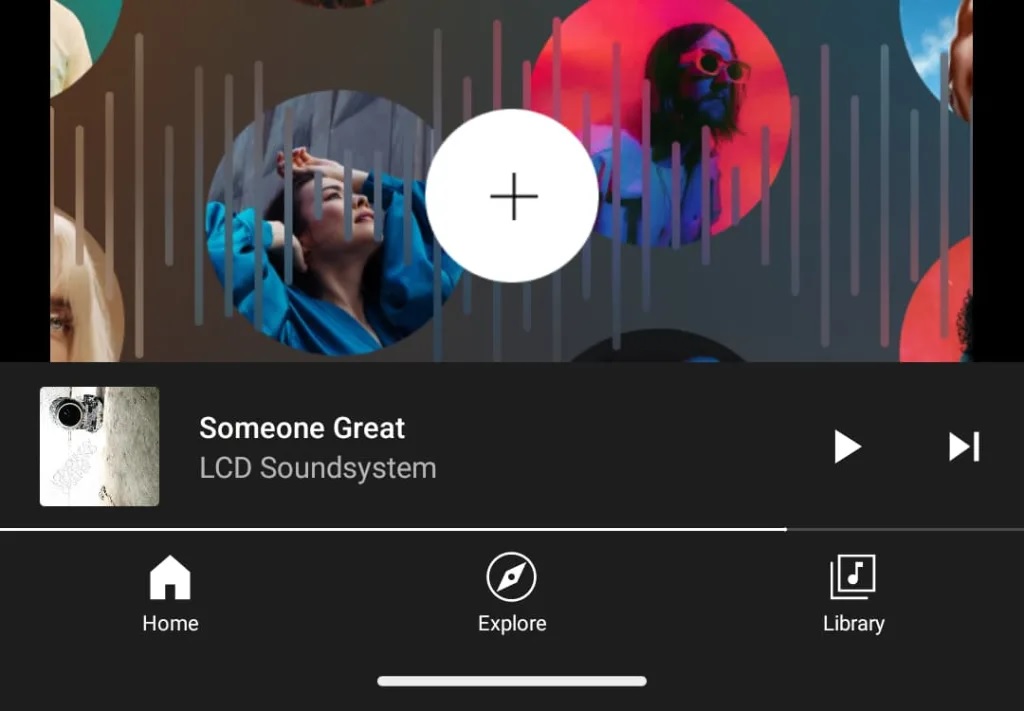
Currently, the updated miniplayer design is only available for Android phones and tablets, with no release on iOS devices as of yet. Consequently, several YouTube Music users have expressed their dissatisfaction with the recent change, urging YouTube to reconsider and revert to the previous design. Despite user feedback, YouTube has not responded to these concerns and has chosen to continue with the modified design.
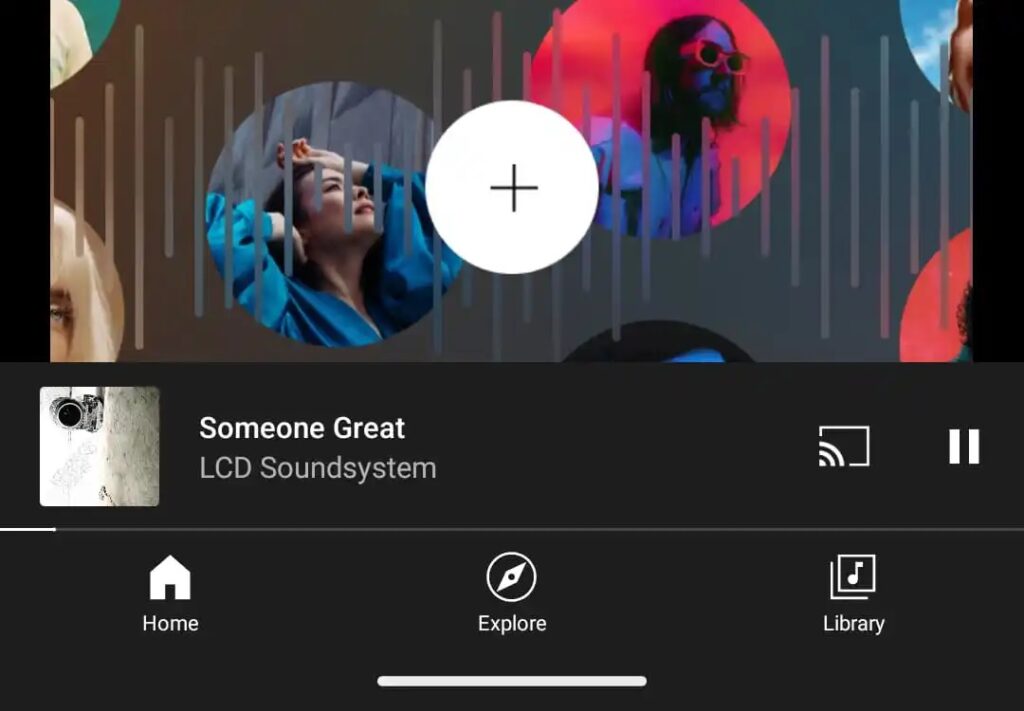
The addition of a permanent Cast button demonstrates YouTube Music’s commitment to enhancing the overall listening experience and catering to users’ preferences for seamless music playback across multiple devices. By enabling users to effortlessly transfer their favorite tracks to larger screens or speakers, the Cast feature opens up new possibilities for enjoying music in various settings.
However, the removal of the next song button and the ability to clear the queue has garnered criticism from users who relied on these features for a more personalized and efficient music streaming experience. The absence of a direct option to stop playback or create a new queue has inconvenienced many listeners, particularly those with extensive music libraries or those who frequently curate playlists.
YouTube Music’s decision to release the updated miniplayer design exclusively for Android devices has left iOS users awaiting a similar update. While the platform has not provided a specific timeline for the release on iOS, it is anticipated that the update will eventually be made available to Apple users.
As users voice their concerns and request a return to the previous design, it remains to be seen whether YouTube Music will address these criticisms or make adjustments to strike a better balance between the new Cast functionality and the removed features. For now, users will need to adapt to the modified miniplayer design and explore alternative methods to manage their music queues effectively.
For More Such Updates Follow Us On – Telegram, Twitter, Google News, WhatsApp and Facebook