Connect with us

Apps

OnePlus launches Zonely App which Track Time Zones – Download Now

Published

on

oneplus zonely app

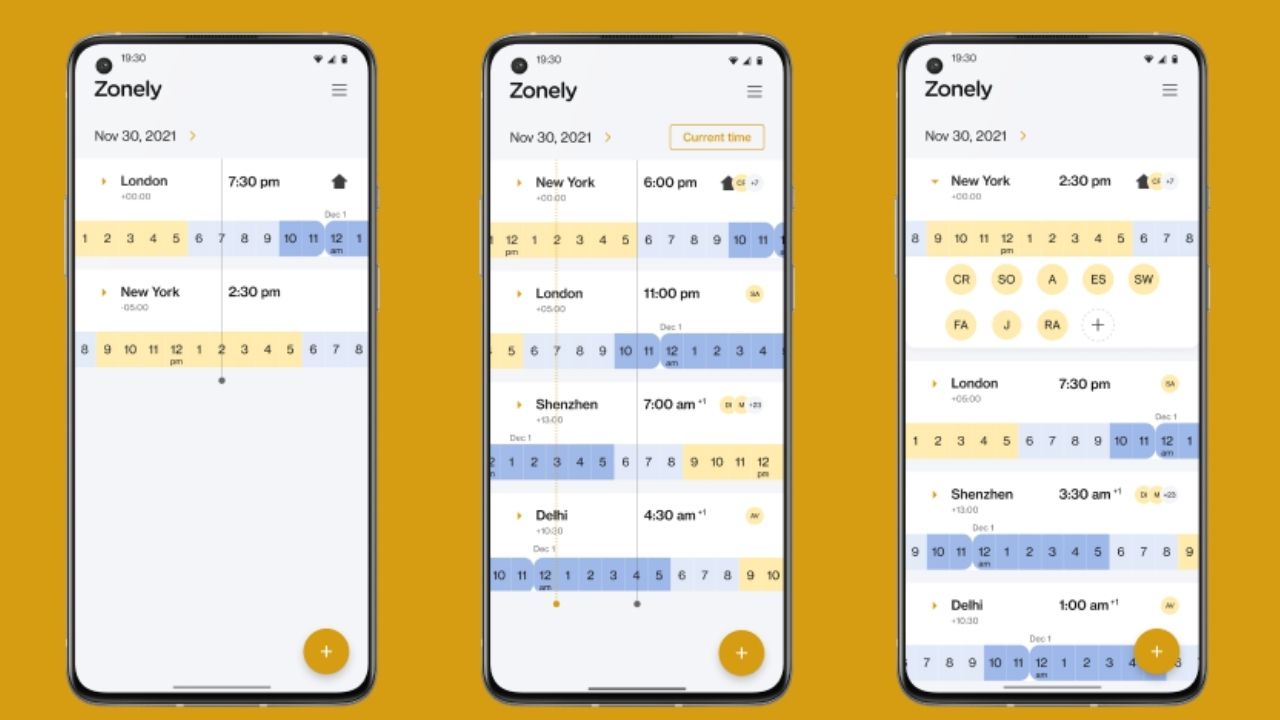
OnePlus has released Zonely, a new app that aids in the tracking of time zones. The app’s main purpose is to help you identify the perfect time to meet up with your friends, relatives, family, and coworkers.

OnePlus Zonely App

The Zonely app is one of the most basic and simpler apps available. It’s the ideal opportunity to catch up with friends and family. Furthermore, you can add your squad to cities all over the world. You may also sync your calendar to see what the optimal times are for meetings.

OneLab is the company behind the Zonely app. The team has gone to great lengths to make the application’s UI look creative. The app, which has a simple yet stylish design, offers the convenience of the time zone at your fingertips.

Also read: OnePlus Wellpaper – Live Wallpaper App Latest Version Released [2.3.0]

Key Features

  • Add as many cities around the world as you like
  • Add your friends, family, or team to see their location
  • Update your working hours to see overlapping times for business
  • Scroll to search for the best time

Currently, the application is only available for Android devices, but the company plans to introduce an iOS version soon. The app can be downloaded from the link provided below.

DOWNLOAD THE ZONELY APP

Source: OnePlus Community

Also read: How to Update To OxygenOS 12 from OxygenOS 11 Manually if we didn’t get OTA Update – Check The Guide and Files

If you like our article then follow us on Google news, and Instagram, or join our Telegram GroupFor the latest TechNews and Reviews, follow Techibee on Twitter and Facebook, and subscribe to our Youtube channel.

Ashok Mor (also known as TechiBee) owns a YouTube channel named TechiBee. He has been providing various tips, tricks and latest tech videos in the world of smartphones.

Click to comment

Leave a Reply

Your email address will not be published. Required fields are marked *

Google

Google Play Store Battery Drain Warning: Android Will Soon Alert Users About Power-Hungry Apps

Published

on

Google Play Store app icon displayed on an Android smartphone screen alongside Facebook and Galaxy Store icons.

Google Play Store Battery Drain Warning Explained

Google Play Store battery drain warning is a new feature being developed by Google that will alert users before installing apps that may consume excessive battery power. The update is designed to help Android users avoid apps that run heavy background processes and negatively impact device battery life.

According to recent reports, Google plans to introduce warning labels on the Play Store listing page when an app is detected to use significantly more battery than expected. This feature will rely on data collected through Android’s performance monitoring system to determine whether an app is draining power inefficiently.

depositphotos 64742243 stock photo google play logo on google

The goal of this change is to improve transparency in the Play Store ecosystem while encouraging developers to optimize their apps for better battery efficiency.

How Google Detects Battery-Draining Apps

Google will use Android’s internal metric known as Excessive Partial Wake Locks to evaluate how frequently an app keeps the device awake in the background. When apps trigger this condition too often, it indicates that they are consuming power unnecessarily.

Apps that exceed the defined threshold in a notable percentage of user sessions may receive a warning label in the Play Store. The alert will inform users that the application may use more battery than expected compared with similar apps.

This system is expected to rely on aggregated performance data collected from Android devices, ensuring that warnings are based on real-world usage rather than isolated testing.

What It Means for Android Users and Developers

For users, the new Play Store warning system could make it easier to avoid installing poorly optimized applications. Battery performance is one of the most common concerns among smartphone users, and identifying problematic apps before installation may significantly improve daily device usage.

For developers, the feature introduces stronger incentives to optimize background processes, reduce unnecessary wake locks, and improve app efficiency. Applications that trigger battery drain warnings may also lose visibility in recommendations or rankings within the Play Store.

Overall, this upcoming feature reflects Google’s broader effort to improve Android performance, transparency, and user experience. By highlighting battery-intensive apps directly in the Play Store, Android users will gain better control over the apps they install and the impact those apps have on their device’s battery life.

Source: Phonearena

Also Read: iOS 26.4 Beta 3 Released: Apple Rolls Out Revised Developer Build With New Apple Music and Security Updates

Continue Reading

Google

Google Chrome Update Cycle Reduced to Two Weeks: What the Faster Release Schedule Means for Users and Developers

Published

on

Google Chrome logo displayed on a red background representing the faster Chrome browser update cycle.

Google Chrome update cycle

Google Chrome update cycle is about to become significantly faster as Google plans to reduce the browser’s release schedule from four weeks to two weeks. The change is expected to begin with Chrome 153, which is scheduled to roll out on September 8, 2026. With this move, Google aims to deliver new features, performance improvements, and security patches to users more quickly across multiple platforms.

Chrome Panorama Search Customizing Color Blog Asset

For several years, Google Chrome has followed a four-week stable release cycle. Under the new plan, the company will shorten this cycle to two weeks for the stable channel. The faster release cadence will apply to Chrome versions running on desktop operating systems as well as mobile platforms including Android and iOS.

Faster feature rollouts and security improvements

The primary goal behind the faster Chrome release cycle is to accelerate the delivery of new capabilities and critical security updates. With shorter release intervals, users will receive improvements sooner without waiting an entire month for the next major version.

Google also believes that smaller and more frequent updates can help developers identify bugs more easily. Instead of large feature drops in monthly updates, incremental changes can be tested and fixed faster, which ultimately improves browser stability.

Another advantage of the new schedule is improved responsiveness to web standards. As the web ecosystem evolves rapidly, Google wants Chrome to adapt faster by introducing support for new APIs, web technologies, and developer tools at a quicker pace.

Beta channel will follow the same schedule

Along with the stable version, Chrome’s Beta channel will also transition to the two-week release cadence. This means developers and early testers will receive upcoming features sooner and can provide feedback before the updates reach the stable version used by the general public.

However, Google will maintain an Extended Stable option for organizations and enterprise users that require a more predictable update schedule. The Extended Stable channel will continue to receive updates every eight weeks, allowing IT administrators more time to test compatibility before deploying new browser versions across company devices.

What it means for Chrome users

For everyday users, the change will likely go unnoticed in terms of usability, but it will bring benefits in the background. Security patches will arrive faster, browser performance improvements will roll out more frequently, and new features will reach devices sooner than before.

With Chrome already being one of the most widely used web browsers globally, this shift to a two-week release cycle signals Google’s effort to keep pace with the rapidly evolving internet while ensuring the browser remains secure and efficient.

Source: theverge.com

Also Read :Google Pixel Tablet Android Desktop Mode: A New PC-Like Experience Coming to Android

Continue Reading

Google

Google Translate Live Translate Update Gets Major Upgrade With Improved UI

Published

on

Google Translate app screen on Android highlighting the Transcribe feature in Conversation mode.

Google Translate Live Translate update is rolling out with a refreshed interface and improved audio customization features, making real-time language conversations more intuitive and user-friendly. According to a recent report by Android Authority, Google is testing notable enhancements that refine how users interact with Live Translate inside Google Translate.

Refreshed Interface for Better Conversations

The updated Live Translate interface focuses on clarity and ease of use. The redesign simplifies on-screen elements, making conversations between two languages feel more seamless. Buttons are better positioned, text is more readable, and the layout appears cleaner compared to previous versions.

Live Translate, also known as Conversation Mode, allows two people speaking different languages to communicate in real time. With this update, starting and managing multilingual conversations becomes quicker and less cluttered. The improved layout is particularly useful for travelers, business professionals, and students who rely on instant translation during discussions.

Customizable Audio Playback and Widgets

Another key improvement in the Google Translate Live Translate update is enhanced audio playback control. Users may get more flexibility in adjusting tone or playback behavior, ensuring translated speech sounds clearer and more natural in conversations.

Additionally, Google appears to be working on improved home screen widgets. These widgets allow faster access to Live Translate directly from the Android home screen. Instead of navigating through the app, users can instantly launch conversation mode with a single tap, saving valuable time.

What This Means for Android Users

The Google Translate Live Translate update signals Google’s continued investment in AI-powered communication tools. By refining the interface and adding practical customization options, the app strengthens its position as one of the most reliable real-time translation solutions on Android.

Although the features are currently spotted in testing, they suggest that a broader rollout may follow soon. If implemented widely, these changes could significantly enhance how users communicate across languages in everyday scenarios.

Also Read: Vivo X300 Ultra with Telephoto Extender Debuts with Stunning 400mm Zoom at MWC 2026

Continue Reading