Connect with us

Apps

Truecaller Introduces Call Recording Feature for iPhone Users, Enhancing Communication Experience

Published

on

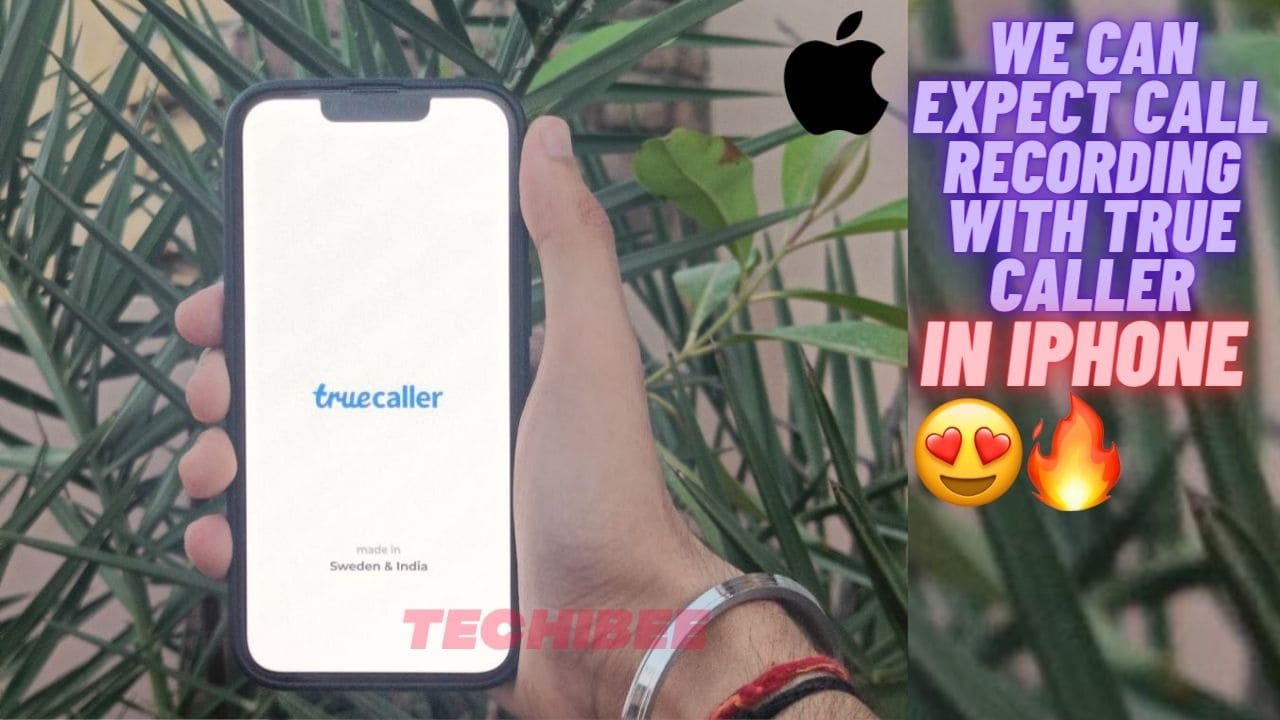
truecaller for iPhone with call recording

Truecaller is a Caller ID and Call Blocking app available for Android and iOS. As we know, call recording is one of the most used and useful features in a smartphone. But in iPhones, we won’t get this call recording feature.

But according to a recent Tweet by Mukul Sharma whose username is @stufflistings, we will be able to record calls using Trucaller in Both Android and iOS. As most iPhone users want to record calls on their iPhones. But now with the upcoming update of Truecaller iOS users can record calls. We have the option to record calls in Android previously in Trucaller. But it was removed. But now we got this feature again in Android and iOS. For now, the option is only available in the US. But we can expect this call recording feature on both platforms.

One of the biggest problems for iPhone users is this call recording. They have to use a secondary Android Smartphone to record calls with the help of Google Dialer. Also, there are not so many features available in Trucaller that we are getting in iPhone if we compare it with Android. Also, we have to purchase Truecaller Premium to access some additional features.

How to record calls using Truecaller on iPhones

The image given below shows how you can record calls in iPhones with the Upcoming update of Truecaller:
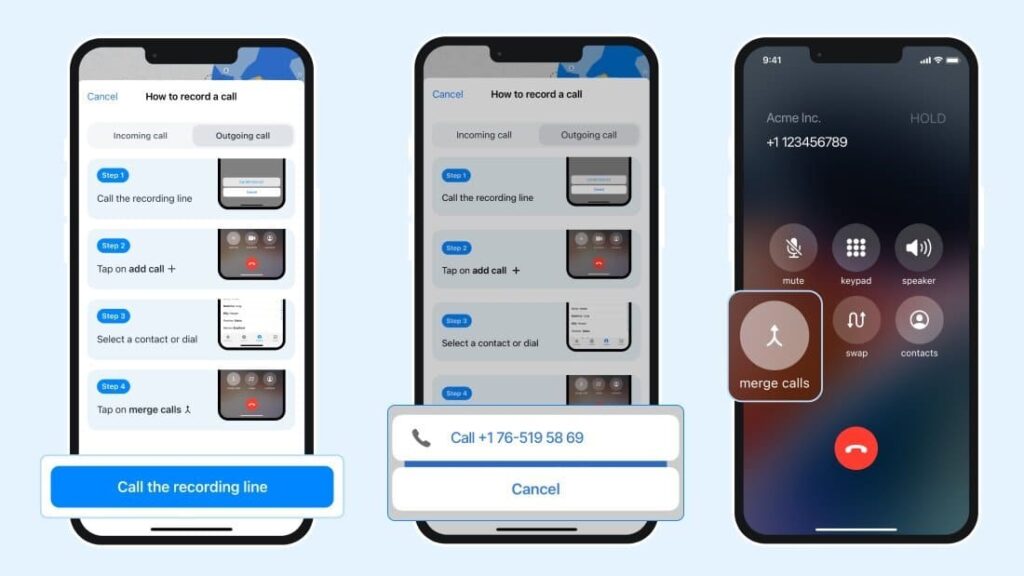
how to record calls in iPhones using truecaller

To record calls, Follow these Steps

  • First you have to make a call.
  • Then you have to tap on Add call.
  • Then you have to make call on another number.
  • After that click on merge calls.

Do let us know in the comment section, how many of you are interested in this call-recording feature.

Ashok Mor (also known as TechiBee) owns a YouTube channel named TechiBee. He has been providing various tips, tricks and latest tech videos in the world of smartphones.

One UI

OxygenOS 17 Features: OnePlus Could Transform Android Experience With These One UI 8.5 Upgrades

Published

on

Samsung Galaxy smartphone displaying One UI 8.5 update widgets and calendar features with bold One UI 8.5 text in the background.

OxygenOS 17 Features Could Finally Redefine the OnePlus Experience

OnePlus users are eagerly waiting for the next major Android update, and OxygenOS 17 features could become a game changer if the company adopts some of the smartest innovations recently introduced in Samsung’s One UI 8.5. From AI-powered call screening to advanced customization tools, Samsung has significantly improved user experience, and many Android enthusiasts believe OnePlus should follow a similar path.

marter Lock Screen and Dynamic UI

One of the standout additions in One UI 8.5 is the adaptive lock screen system. The clock automatically adjusts its position based on the wallpaper layout, creating a cleaner and more modern appearance. Weather animations directly on the lock screen also make the interface feel more interactive and alive. These are the kinds of OxygenOS 17 features users would love to see on future OnePlus smartphones.

Samsung has also redesigned search bars and animations throughout the interface, introducing smoother transitions and pill-shaped UI elements. If OnePlus adopts similar refinements, OxygenOS 17 could deliver a far more premium visual experience.

Advanced Control Center Customization

Another feature that deserves attention is the highly customizable control center. Users can resize quick setting tiles, rearrange layouts, and even modify tile shapes according to personal preference. This level of customization aligns perfectly with OnePlus’ enthusiast-focused audience.

Partial screen recording is another highly useful upgrade. Instead of recording the entire display, users can select a specific area while maintaining custom aspect ratios. Content creators and professionals would greatly benefit from this functionality.

AI Features Could Be the Future of OxygenOS

Artificial intelligence is becoming central to smartphone software, and One UI 8.5 showcases this clearly. Samsung introduced an AI-powered call screening feature that answers calls, identifies the caller’s purpose, and converts speech into text in real time.

The update also includes AI image editing tools that can add objects, pets, or backgrounds directly inside photos using simple prompts. These intelligent editing capabilities could make OxygenOS 17 far more competitive against Samsung and Google Pixel devices.

Better File Sharing and Camera Controls

Samsung has improved cross-platform sharing by enabling easier file transfers with iPhones through Quick Share. Meanwhile, Pro Video mode now allows creators to hide on-screen controls instantly and apply LUT filters directly while editing videos.

If OnePlus introduces similar OxygenOS 17 features, the company could once again become a top choice for Android power users and creators.

Conclusion

OxygenOS has always been known for speed and simplicity, but users now expect smarter AI tools, deeper customization, and refined animations. By incorporating features inspired by One UI 8.5, OxygenOS 17 could become one of the most exciting Android updates in recent years.

Also Read: Google Announces Major Android Updates With Smarter AI Features and Better Cross-Device Connectivity

Continue Reading

Android

Google Announces Major Android Updates With Smarter AI Features and Better Cross-Device Connectivity

Published

on

Android Quick Share interface showing easy and secure photo sharing options on a smartphone.

Android Updates 2026 Bring Smarter AI Features

Android updates 2026 are set to transform the overall user experience with Google introducing several new features focused on artificial intelligence, device connectivity, and stronger security. The latest announcement highlights how Android is evolving beyond smartphones and becoming a connected ecosystem powered by Gemini AI.

Google revealed that Gemini AI will now play a much bigger role across Android phones, cars, watches, tablets, and laptops. The company is aiming to create a seamless experience where users can continue tasks smoothly across multiple devices without interruptions.

Gemini AI Expands Across the Android Ecosystem

One of the biggest highlights from the latest Android update is deeper Gemini AI integration. Google is bringing AI-powered assistance to more devices, including Android Auto and Wear OS. Users will be able to access smarter suggestions, contextual responses, and better voice interactions while driving or using connected devices.

Gemini AI is also expected to improve productivity by helping users manage notifications, messages, and searches more efficiently. Google appears focused on making AI feel more natural and useful in everyday tasks rather than limiting it to standalone chatbot experiences.

Quick Share Gets Better Cross-Platform Support

Google has also improved Quick Share functionality. The updated feature will now support easier file sharing through QR codes, making transfers between Android devices much faster. In addition, Google is working on better compatibility for sharing files with iPhone users, reducing one of the long-standing limitations in the Android ecosystem.

The company says these changes are designed to simplify sharing photos, videos, and documents without depending on third-party apps.

Android Security Features Receive Major Improvements

Security remains another key focus in the latest Android updates. Google announced enhanced anti-scam protection and theft detection features aimed at protecting users from growing cyber threats. These tools will use AI-powered analysis to identify suspicious activities, fraudulent calls, and unauthorized access attempts in real time.

Google is also making it easier for users switching from iPhone to Android by improving the migration process for apps, contacts, and personal data.

Google’s Vision for the Future of Android

With these new upgrades, Google is positioning Android as a smarter and more connected platform powered heavily by AI. The latest Android updates show the company’s strategy of combining security, convenience, and cross-device functionality into a unified experience.

As competition in the smartphone industry continues to grow, these features could help Android users experience better productivity, stronger security, and smoother connectivity in daily life.

Also Read: OxygenOS 16.1 Update Brings Stunning Animations, AI Features and a Revamped Camera UI

Continue Reading

Nothing

Nothing Gallery Update Adds Drawing Tools, But Still Lags Behind OxygenOS Experience

Published

on

Nothing Gallery vs OnePlus OxygenOS gallery editing comparison showing advanced vs basic markup tools on smartphones

Nothing Gallery Update has started rolling out with new editing features, but it still feels incomplete when compared to competitors like OnePlus and its OxygenOS gallery experience. The latest version introduces drawing and markup tools, aiming to enhance photo editing directly within the app. However, the implementation raises questions about usability and feature depth.

What’s New in Nothing Gallery Update

The latest update (version 2.8) introduces a set of basic editing tools under a new drawing section. Users can now add doodles, notes, shapes, and highlights to images. The update also brings options like customizable colors, stroke thickness, and opacity adjustments, making it easier to personalize edits.

Additionally, the mosaic blur feature allows users to hide sensitive details in images, which can be particularly useful for screenshots or sharing private information. Shapes such as arrows, rectangles, circles, and lines can also be added and adjusted with options to rotate, resize, and reposition.

These changes are confirmed in the update notes and demonstrated in detail in the provided source content .

User Experience Still Feels Limited

Despite the addition of new tools, the overall user experience remains underwhelming. The interface itself hasn’t changed, and the editing tools require manual selection for each action. For example, drawing a circle or line requires choosing specific tools rather than allowing gesture-based automatic shape detection.

This is where competitors like OnePlus stand out. On OxygenOS, users can simply draw a rough shape and hold for a moment, and the system automatically converts it into a perfect shape. This makes editing faster and more intuitive.

In contrast, Nothing’s implementation feels more rigid and less refined, requiring extra steps for actions that should be seamless.

Missing Advanced Features

Another limitation is the absence of advanced editing capabilities. Features like automatic blur detection, smart markup suggestions, or AI-powered enhancements are still missing. While the current update adds basic functionality, it does not significantly elevate the app to match modern standards.

Even after over a year since the launch of the Nothing Gallery app, the pace of feature development appears slow. Users expecting a polished and feature-rich gallery experience may find it lacking.

Final Thoughts

The Nothing Gallery Update is a step in the right direction, introducing essential tools that were previously missing. However, it still falls short when compared to more mature gallery apps available on other Android skins.

For now, it serves as a basic editing solution rather than a fully competitive gallery platform. Future updates will need to focus on smarter implementations and advanced features to truly stand out.

Also Read: Qualcomm Stock Surge Signals Smartphone Recovery and AI Chip Expansion

Continue Reading