
News
Meta’s Threads Rapidly Gains 90 Million Users, Poised to Break App Growth Records

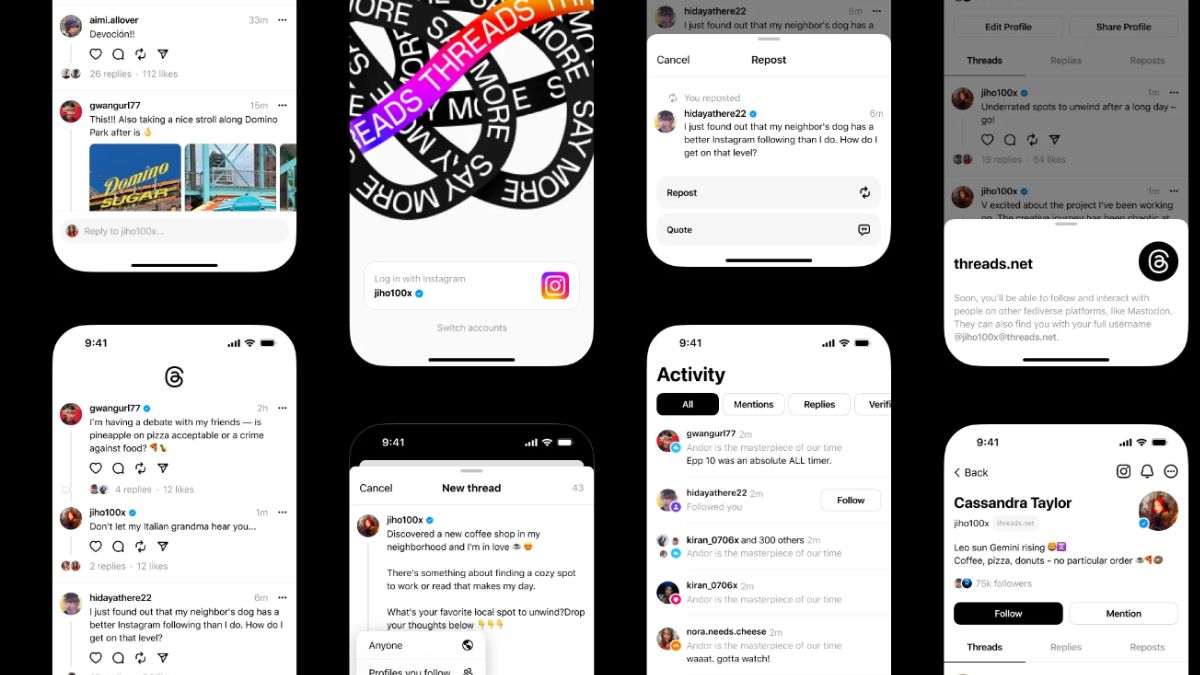
With the constant evolution of social media platforms, the arrival of a new competitor often catches attention and piques curiosity. However, with Meta’s backing, Threads is positioning itself as a promising text-first social media platform, aiming to provide a positive space for public conversations. With Twitter’s recent challenges under Elon Musk’s ownership, Threads aims to capitalize on the demand for a new and refreshing social media experience.
Distinct from its predecessors like Mastodon and BlueSky, Threads leverages the support of Meta, led by the influential Mark Zuckerberg. With an emphasis on seamless integration, Threads allows users to access the platform through their existing Instagram accounts. This convenient onboarding process grants access to the 2.35+ billion Instagram user base, enabling them to effortlessly transition and repopulate their new Threads feed with the individuals they follow on Instagram.
Threads has demonstrated tremendous potential, amassing over 90 million users at the time of this writing. This remarkable growth trajectory positions Threads as a strong contender to potentially claim the title of the fastest-growing app in history.
The core features of Threads are explained below, along with some tips for users:
Feed:
- The feed utilizes an algorithmic approach, combining content from followed accounts with suggested profiles.
- Users have control over who can reply to their threads by choosing the desired audience during thread creation.
- The ability to mute undesirable accounts is accessible by tapping the ••• icon next to the post.
Posts:
- There is a character limit of 501 for individual posts.
- Posts can be easily shared to Instagram Stories, with the added option to enhance the story using Instagram Stories filters.
- Post sharing may experience slight delays due to the platform’s high traffic.
Photos:
- Users can share multiple photos in a carousel format. Unlike Instagram, Threads’ carousels display pictures with varying sizes and ratios in an aesthetically pleasing manner.
- No noticeable limitations have been observed regarding file size, resolution, or image quality.
Videos:
- Videos are visually appealing but muted by default.
- The platform imposes a five-minute time limit for videos, although resolution restrictions are yet to be identified.
Links:
- Most links shared on Threads are accompanied by properly embedded images.
- Users can include a link in their bio by editing their profile, akin to the functionality on Instagram.
Account/Privacy:
- Threads offers the option to switch to a private profile independent of Instagram.
- Users can change their Threads profile picture, which remains separate from their Instagram account.
- The platform allows muting specific words, providing users with greater control over their experience.
- Notification settings offer granularity, allowing customization according to individual preferences.
- Account deletion is currently linked to the deletion of the associated Instagram account, although the Threads team is exploring possibilities for independent account deletion.
- Threads, like other Meta apps, requires access to various data on the user’s phone, which may be a consideration for those concerned about data privacy.
Additional features and future plans:
- Threads offers an interactive web client, although its functionality is limited to read-only access.
Users can expect a feed consisting exclusively of followed accounts, as confirmed by Mark Zuckerberg and Adam Mosseri. - Search functionality is currently limited to usernames, with future plans to include specific threads and trends.
- Hashtags, direct messaging, and other features are considered low priority and may be introduced in subsequent updates.
- Users can sign up for the beta program to gain early access to upcoming features.
While Threads has yet to launch in the EU due to data usage concerns, users can sideload the app via APK installation. It is important to exercise caution when accessing third-party sources for download.
It is worth noting that Elon Musk has expressed discontent towards Threads, as several ex-Twitter employees allegedly joined Meta’s Threads team, potentially leveraging their knowledge and secrets from Twitter. In response, Musk’s attorney sent a cease and desist letter to Mark Zuckerberg, threatening legal action against Meta. A light-hearted suggestion of a potential resolution through a physical competition was made, adding a touch of humor to the situation.
With Meta’s resources and the unique features Threads offers, it is poised to become a significant competitor in the social media landscape. As the platform continues to evolve and attract a growing user base, its impact on the industry remains to be seen.
For More Such Updates Follow Us On – Telegram, Twitter, Google News, WhatsApp and Facebook














Recently, at the MWC 2024 event, which was held in Barcelona, Samsung’s VP, Hon Pak confirmed that the upcoming Galaxy Ring will not be supported by iPhones. Pak also said that their products are as good as the Apple ones.
There are also very good reasons to switch to Samsung’s ecosystem. Samsung is also working on making their devices compatible with other Android devices as well, not only with their own.
As we already know, Galaxy Ring comes in various sizes. Among them, the smallest one is powered with a battery of 14 mAh, and the largest one comes with a bigger battery of 21.5 mAh which will provide a battery backup of 5-9 days.

Until now, the launch of Galaxy Ring has not been revealed but some rumors suggested that it will launch in the Unpacked Event, which is going to be held in July along with Samsung’s upcoming Galaxy Z Fold 6 and Z Flip 6.
What do think about this move taken by Samsung? Do let us know in the comment box. Also, tell us whether you like this post or not.
For More Such Updates Follow Us On – Telegram, Twitter, Google News, WhatsApp and Facebook
Apple
Is your iPhone or iPad eligible for iOS 18 and iPadOS 18 Update – Here is a list of eligible devices

Every year, Apple announces its new iOS, iPadOS, and MacOS versions in its WWDC (World Wide Developer Conference) which will held at Apple Park in June. This year, Apple will announce iOS 18, iPadOS 18, and MacOS 15. The developer Beta of iOS 18 will be available after the announcement at the WWDC event but if we talk about the stable version of iOS 18 and iPadOS 18 update, then it will be available by September. In this post, we will tell you the list of iPhones and iPads that are eligible for the iOS 18 and iPadOS 18 update.
Devices Eligible for iOS 18 and iPadOS 18 Update
First, let’s talk about the list of iPhones, that are eligible for the iOS 18 Update:
- iPhone 15
- iPhone 15 Plus
- iPhone 15 Pro
- iPhone 15 Pro Max
- iPhone 14
- iPhone 14 Plus
- iPhone 14 Pro
- iPhone 14 Pro Max
- iPhone 13
- iPhone 13 mini
- iPhone 13 Pro
- iPhone 13 Pro Max
- iPhone 12
- iPhone 12 mini
- iPhone 12 Pro
- iPhone 12 Pro Max
- iPhone 11
- iPhone 11 Pro
- iPhone 11 Pro Max
- iPhone XS
- iPhone XS Max
- iPhone XR
- iPhone SE (2nd generation)
- iPhone SE (3rd generation)
Now, let’s talk about the list of iPads, that are eligible for the iPadOS 18 Update:
- iPad Pro: 2018 and later
- iPad Air: 2019 and later
- iPad mini: 2019 and later
- iPad: 2020 and later
iOS 18 brings new Generative AI support with Siri, design changes, and RCS message support in Apple’s iMessage. If you want to know more about the features of the iOS 18 update, then we have already created a dedicated post for that, do check that out.
Is your iPhone or iPad eligible for iOS 18 or iPadOS 18 update? Do let us know in the comment box. Also, do tell us whether you like this post or not.
For More Such Updates Follow Us On – Telegram, Twitter, Google News, WhatsApp and Facebook
Apple, an American-based Tech Giant has recently shared full release notes for the iOS 17.4 update, which is expected to be launched in the first week of the next month i.e. March. If you want to know the upcoming changes or new addons that we get after updating the iPhone to stable iOS 17.4, then we have already posted a dedicated post for that, you can simply check that out by clicking here.
If we talk about them in short, then the upcoming iOS 17.4 update brings major App Store changes in the EU, new emojis, Apple Podcasts transcripts, and an upgrade in the security of Apple’s iMessage. Furthermore, this update also prepares for the launch of the next-generation Apple CarPlay later this year.

As we know, Apple has to follow the EU’s Digital Markets Act. So, to avoid fines, Apple has to roll out the new iOS 17.4 update before the deadline which was given by the EU i.e. 6 March (Wednesday). So, we can expect the iOS 17.4 stable update before or on 6 March. Below listed are the iOS 17.4 U.S. released notes:
Emoji
– New mushroom, phoenix, lime, broken chain, and shaking heads emoji are now available in the emoji keyboard
– 18 people and body emoji add the option to face them in either directionApple Podcasts
– Transcripts let you follow an episode with text that highlights in sync with the audio in English, Spanish, French and German
– Episode text can be read in full, searched for a word or phrase, tapped to play from a specific point and used with accessibility features such as Text Size, Increase Contrast, and VoiceOverThis update includes the following enhancements and bug fixes:
– Music recognition lets you add songs you have identified to your Apple Music Playlists and Library, as well as Apple Music Classical
– Siri has a new option to announce messages you receive in any supported language
– Stolen Device Protection supports the option for increased security in all locations
– Battery Health in Settings shows battery cycle count, manufacture date, and first use on iPhone 15 and iPhone 15 Pro models
– Call Identification displays Apple-verified business name, logo, and department name when available
– Business updates in Messages for Business provide trusted information for order status, flight notifications, fraud alerts or other transactions you opt into
– Apple Cash virtual card numbers enable you to pay with Apple Cash at merchants that don’t yet accept Apple Pay by typing in your number from Wallet or using Safari AutoFill
– Fixes an issue where contact pictures are blank in Find My
– Fixes an issue for Dual SIM users where the phone number changes from primary to secondary and is visible to a group they have messaged
Some features may not be available for all regions or on all Apple devices. For information on the security content of Apple software updates, please visit this website: https://support.apple.com/kb/HT201222
Devices that are eligible for iOS 17.4 Update
At last, if we talk about the eligible devices for iOS 17.4 Update, then iPhone XS and above models are eligible for this update. Whenever you receive the iOS 17.4 update. To update your iPhone, simply head to Settings > General > Software Update.
Are you guys also waiting for the iOS 17.4 stable update? Do let us know in the comment box. Also, tell us whether you like this post or not.
For More Such Updates Follow Us On – Telegram, Twitter, Google News, WhatsApp and Facebook