
Nothing
Nothing Phone (2) vs. Phone (1): What to Expect from the Next Generation

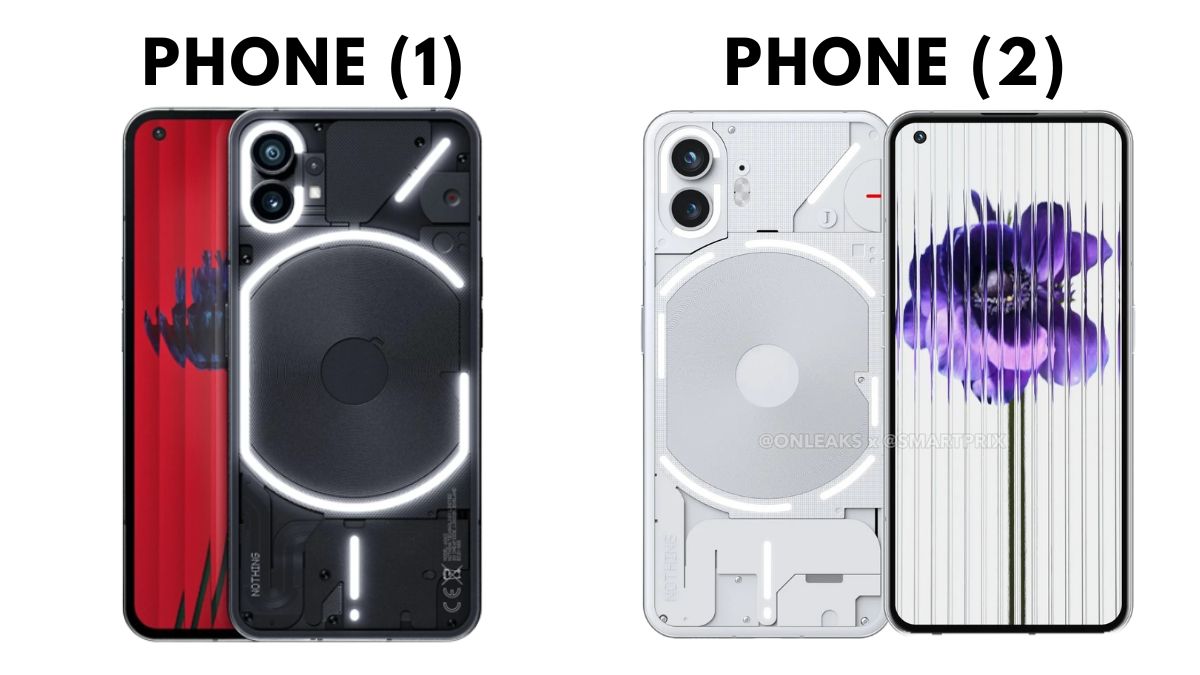
Nothing, the innovative tech company, is gearing up to unveil its highly anticipated second-generation smartphone, the Nothing Phone (2), on July 11. Despite the launch being a few weeks away, the brand has already released a teaser, providing us with a glimpse of the device’s stunning design. Marketed as a “premium” offering, the Phone (2) is expected to bring a range of exciting improvements over its predecessor, the Phone (1).
Revamped Design and Enhanced Features of the Phone (2)
One of the notable enhancements in the Phone (2) is its revamped Glyph interface. The device will showcase a more rounded aluminum frame, departing from the flat frame of the Phone (1). Additionally, both the front and back of the Phone (2) will feature a 2.5D curved design, ensuring a more comfortable and secure grip. Another notable visual change is the segmented lighting on the Phone (2) compared to the continuous LED strips seen on the Phone (1).
Larger Display and Improved Grip for an Enhanced User Experience
In terms of display, the Phone (2) will offer a slightly larger screen. It is rumored to feature a left-aligned punch-hole cut-out, slim bezels, and an under-display fingerprint scanner, similar to its predecessor. However, the Phone (2) will likely sport a 0.15-inch bigger display, possibly measuring around 6.7 inches, as opposed to the 6.55-inch screen found on the Phone (1). The Phone (2) is expected to boast a Full-HD+ AMOLED panel with a 120Hz refresh rate, HDR10+ certification, and Corning’s protection.
Camera Upgrades: Capturing Moments in Stunning Detail
Improvements can also be expected in the camera department. The Phone (2) may retain a 50MP primary camera with optical image stabilization (OIS), similar to the Phone (1), accompanied by an ultra-wide sensor (exact resolution unknown). On the front, the Phone (2) is speculated to house a 32MP shooter. The device is also expected to offer camera features such as Raw HDR and the capability to shoot 4K videos at 60fps. Notably, a dual-tone LED flash will be included with the Phone (2).
Powerhouse Performance with Snapdragon 8+ Gen 1 Chipset
Under the hood, the Phone (2) will be powered by the Snapdragon 8+ Gen 1 chipset, offering improved performance compared to its predecessor’s Snapdragon 778G+ processor. The handset may come with up to 12GB of RAM and up to 256GB of storage. It is also reported to boot the Nothing OS 2.0, based on Android 14, and receive three years of guaranteed operating system updates.
Moreover, the Phone (2) will house a larger 4,700mAh battery with support for both wired and wireless charging. This upgrade ensures an extended battery life, enhancing the overall user experience.
Nothing Phone (2) vs. Phone (1): A Comparison of Upgrades
With its array of enhancements, the Nothing Phone (2) aims to entice current users of the Phone (1) and other Android smartphone users alike. The larger display, improved camera capabilities, superior Snapdragon 8+ Gen 1 chipset, and larger battery all make the Phone (2) a compelling choice for those seeking an upgrade. Furthermore, the Phone (2) will provide users with more customization options for the Glyph interface, adding to its appeal.
As anticipation builds for the official launch on July 11, tech enthusiasts and smartphone users eagerly await the unveiling of the Nothing Phone (2) and the innovative features it brings to the table.
For More Such Updates Follow Us On – Telegram, Twitter, Google News, WhatsApp and Facebook










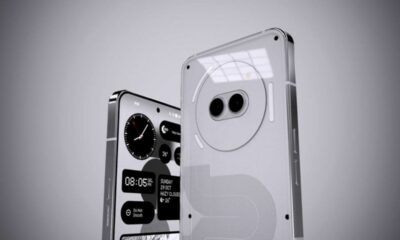


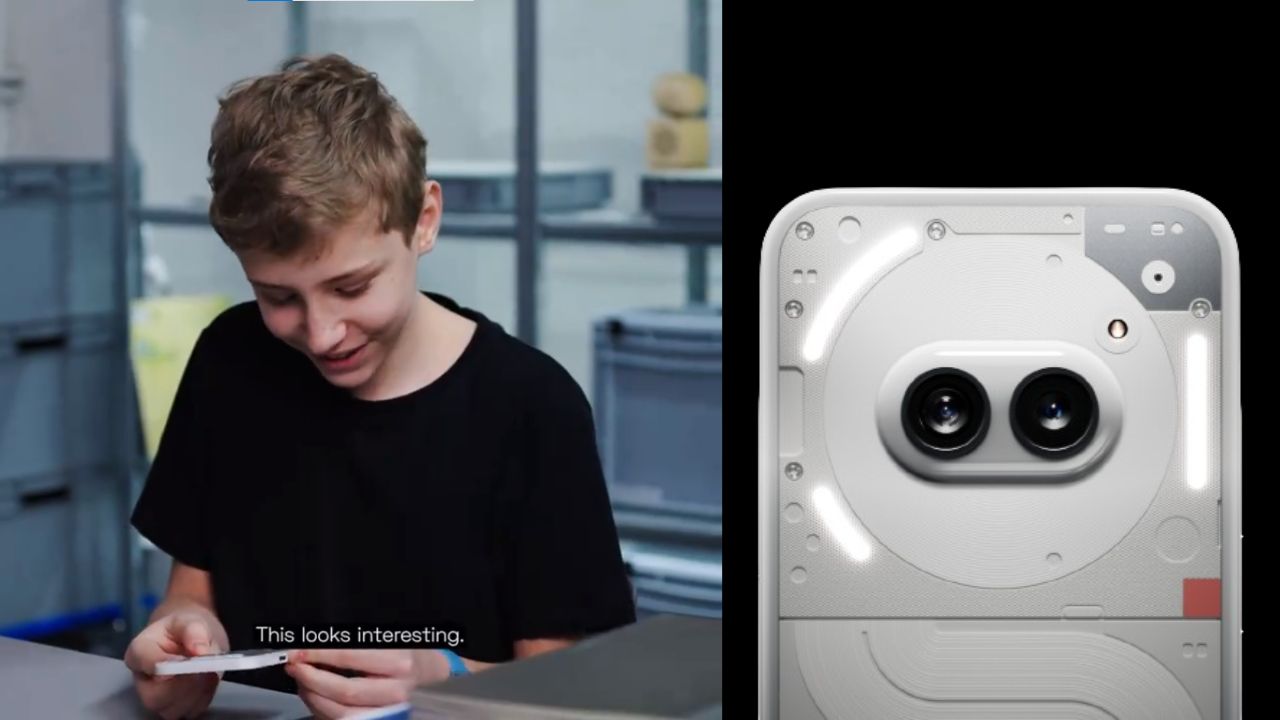
A few hours ago, Nothing which is a London-based smartphone tech manufacturing company, posted a thread on their X formerly Twitter account. In the thread, the company has mentioned “Get ready to unbox Phone (2a). Tomorrow, 10:00 GMT”. The length of the teaser video is 22 seconds.
Maximilian (Max), who is a superfan of Nothing was invited by the Nothing Team to their design studio. Max has unboxed and sees the upcoming Phone (2a). At the end of the teaser video, Max is holding the upcoming Phone (2a). Max has found the phone interesting.
If you want to see the full unboxing video of the Nothing Phone (2a), then it will be Live tomorrow i.e. 28 February at 10:00 GMT (Greenwich Mean Time) on the official YouTube channel of Nothing. If we convert 10:00 GMT (Greenwich Mean Time) to IST (Indian Standard Time), then it is “3:30 P.M.”
Personally, I am super excited about the video of Nothing Phone (2a), do you as well? Do let us know in the comment box. Also, tell us whether you like this post or not.
For More Such Updates Follow Us On – Telegram, Twitter, Google News, WhatsApp and Facebook

Nothing has recently confirmed the launch date of their upcoming Nothing Phone (2a) through a video on their YouTube channel. The upcoming Nothing Phone (2a) is going to launch on 5 March 2024.

The title which is given to the launch event of Nothing Phone (2a) is Fresh Eyes. If we see the teaser image, then it shows the outline of the eyes. Moreover, the teaser image of the Phone (2a) gives us a hint that the rear camera has dual camera lenses which are aligned sideways and are closer to the center of the back.
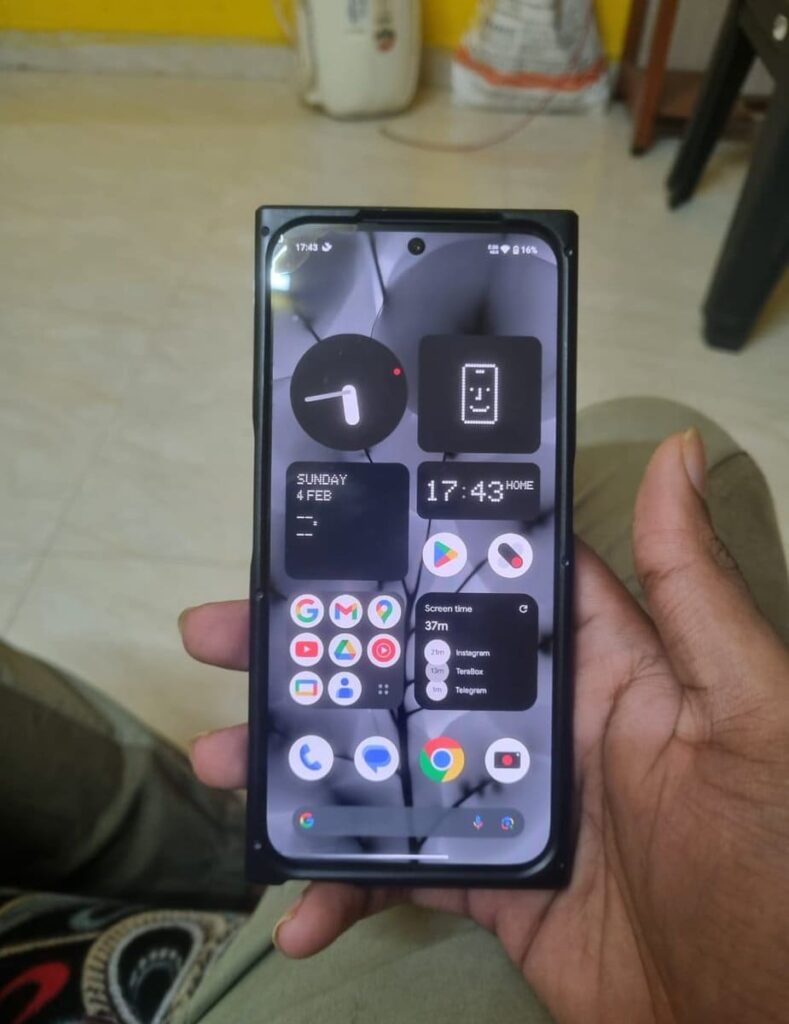
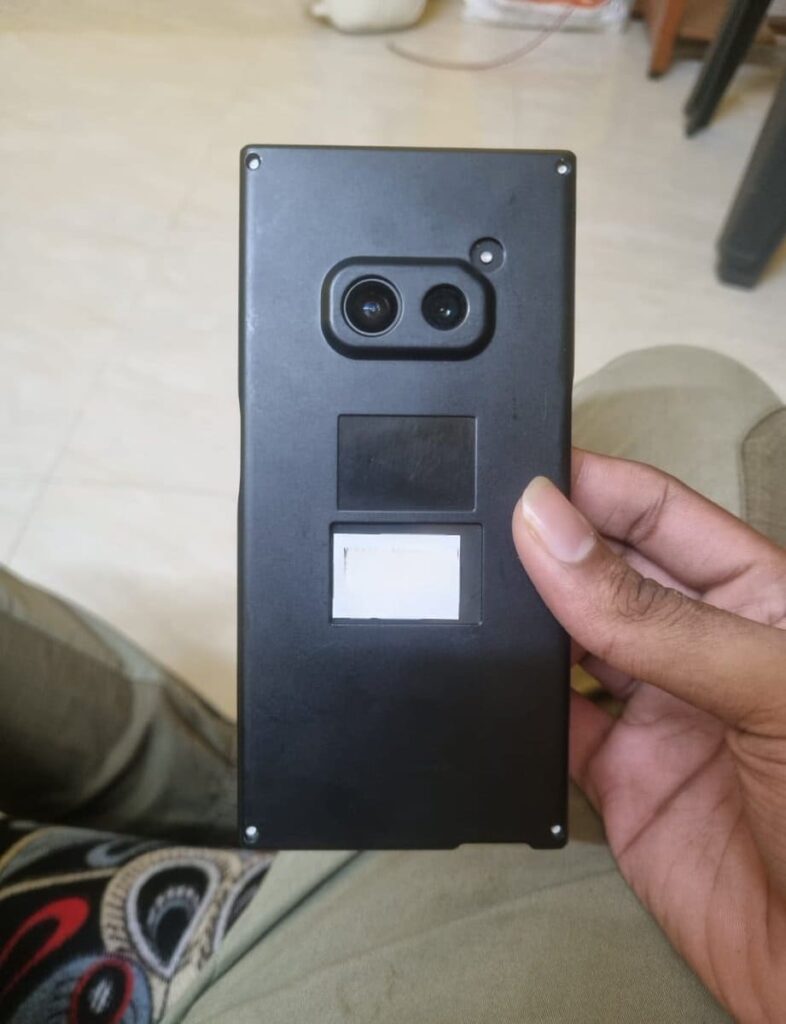
The codename of the Nothing Phone (2a) is Aerodactyl, which is going to be launched by next month. This is expected to be a budget-level smartphone from Nothing. Also, this is the first phone from Nothing that comes with a MediaTek Processor. Nothing claims that this phone pawns elements for Nothing Phone (2), which is an expensive phone from Nothing.
This Nothing Phone (2a) is a clear upgrade from Nothing Phone (1), which is the company’s first smartphone launched back in July 2022. If you want to know more about the specifications of Nothing Phone (2a), then consider this post. Furthermore, Nothing has recently launched the Glyph Developer Kit for developers which allows developers to implement the use of glyph interface in their apps.
Are you guys interested in the Nothing Phone (2a)? Do let us know in the comment box. Also, do let us know whether you like this post or not.
For More Such Updates Follow Us On – Telegram, Twitter, Google News, WhatsApp and Facebook
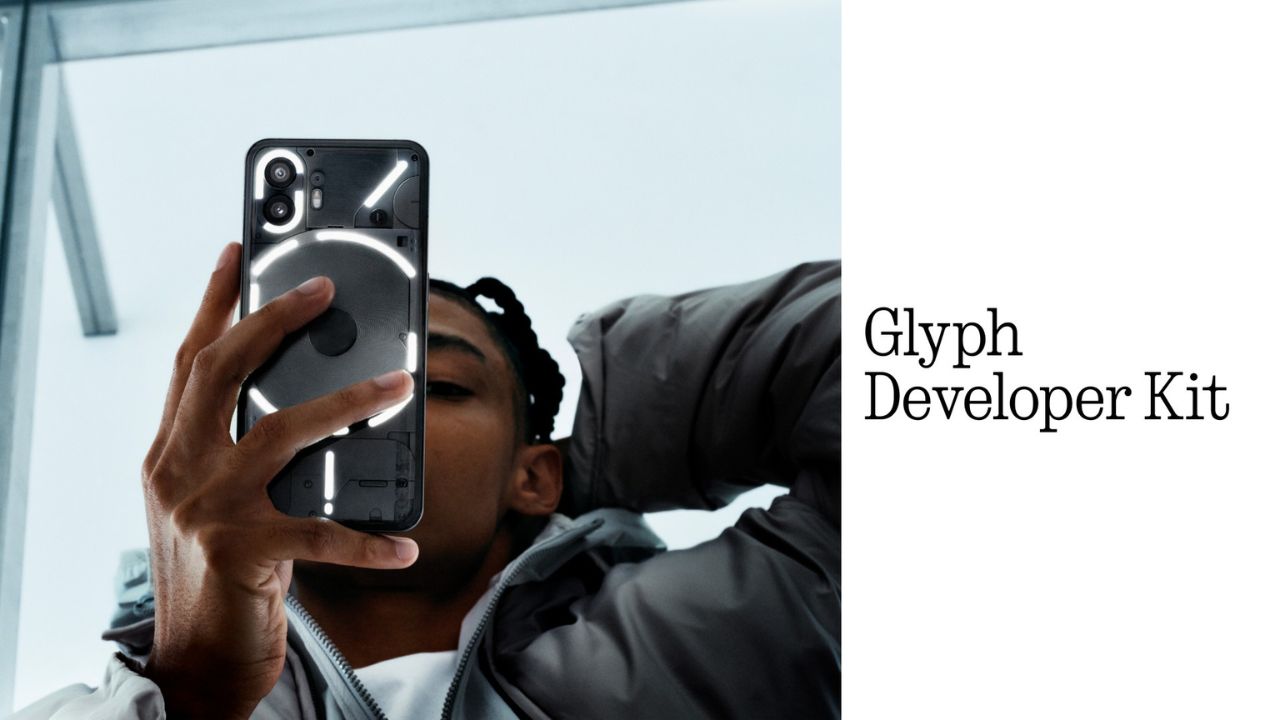
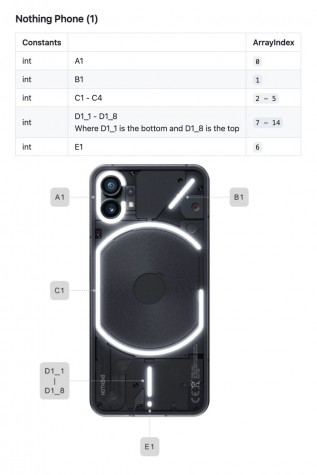
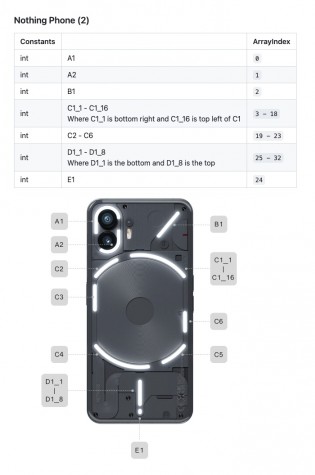
Nothing, a UK-based smartphone manufacturing company has recently released its Glyph Developer Kit which allows developers to take the benefit of the LED lights that are present on the back panel of the Nothing Phone (1) and Nothing Phone (2). With this Glyph Developer Kit, developers can integrate the Glyph functionality in their apps.
Currently, the Software Development Kit also known as SDK is live on GitHub for both Nothing Phone (1) and Nothing Phone (2). If we talk about the programmable LED lighting zones, then Nothing Phone (1) has 12 but on the other hand, Nothing Phone (2) has 33 programmable LED lighting zones which you can see in the images listed below:
Developers can start Twiddle with the Glyph Developer Kit. Moreover, they can sign up, so that they will be notified whenever the registration of the API Key opens. As the Glyph Developer Kit is Live, so we can expect Glyph Interface functionality to be working in more apps.
What do you guys think regarding this, whether we got this Glyph Interface functionality to be working in more apps? Do let us know in the comment box. Also, tell us whether you like this post or not.
For More Such Updates Follow Us On – Telegram, Twitter, Google News, WhatsApp and Facebook